Recap:
Remember how we talked about messages being sent from the POS terminal to Visa’s network and then moving through all the systems? Today, we will talk about how these systems communicate with each other.
You might think it’s very complex and impossible to guess or hack, but actually, the message is quite delicate. A small change in a number results in a very different message being sent. That’s why it is important to understand the Message Type Indicator (MTI) and how it works!
Message Type Indicator (MTI)
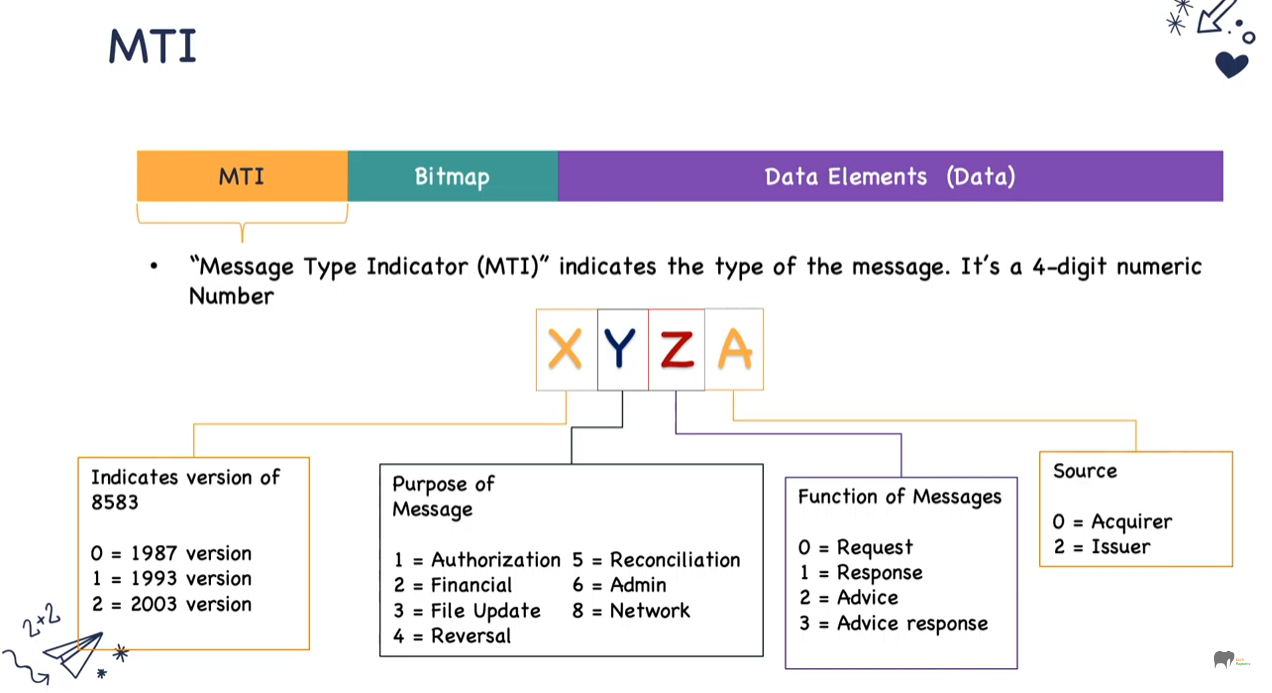
MTI is always a 4-digit numeric number with each digit having a specific meaning:
| Digit Position | Meaning | Description |
|---|---|---|
| 1st Digit | Version | Specifies the ISO8583 version used |
| 2nd Digit | Message Class | Indicates the general message type |
| 3rd Digit | Message Function | Describes the message’s purpose |
| 4th Digit | Message Origin | Identifies the source or flow stage |
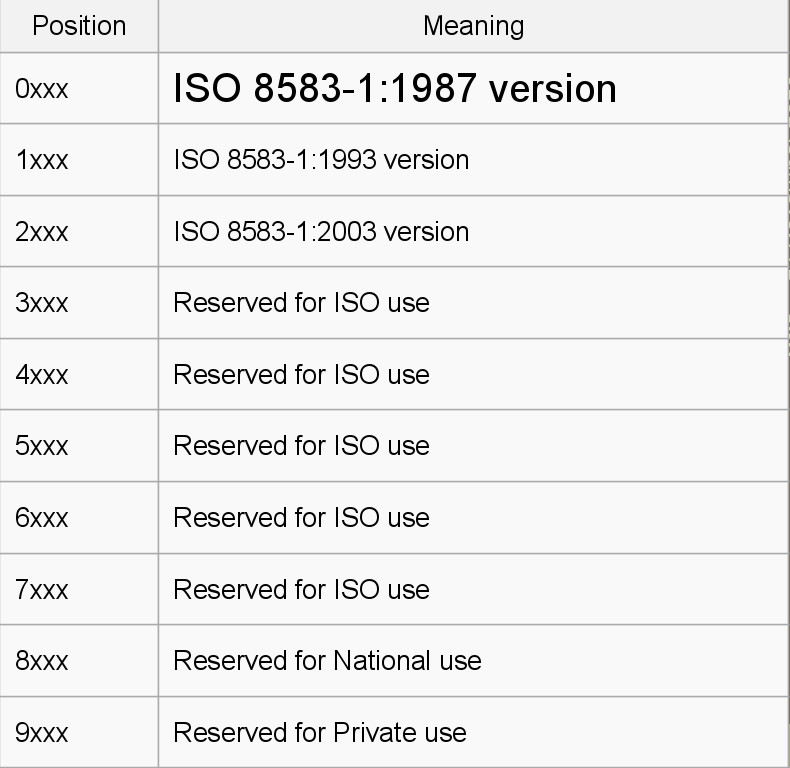
1st Digit (Version)
- 0xxx: 1987’s version of ISO8583
- 1xxx: 1993’s version of ISO8583
- 2xxx: 2003’s version of ISO8583
- 8xxx: National use
- 9xxx: Private use
2nd Digit (Message Class)
- x1xx: Authorisation Message
- x2xx: Financial Message
- x3xx: File Actions
- x4xx: Reversal/Chargeback
- x5xx: Reconciliation
- x6xx: Administrative
- x7xx: Fee Collection
- x8xx: Network Management
3rd Digit (Message Function)
- xx0x: Request
- xx1x: Request Response
- xx2x: Advice
- xx3x: Advice Response
- xx4x: Notification
- xx5x: Notification Acknowledgement
- xx6x: Instruction
- xx7x: Instruction Acknowledgement
4th Digit (Message Origin)
- xxx0: Original
- xxx1: Repeat
- xxx2: Response to Repeat
- xxx3: Reserved
- xxx4: Reverse
MTI Examples
- 0100 = Authorisation Request
- 0110 = Authorisation Response
- 0200 = Financial Transaction Request
- 0210 = Financial Transaction Response
Example: When you tap your card, you send a 0200 Request. When Visa seeks authorisation from your bank, it sends back a 0210 Response.
Note:
- 0100/0110 are authorisation messages usually sent during pre-authorisation scenarios (e.g., car rental or hotel booking), checking if the account has sufficient funds.
- Retail shopping generally uses 0200/0210 financial transaction messages. Some merchants may use 0100/0110 for retail, but it’s not common.
Other useful MTI:
- 0420: Reversal Advice (to correct a previous transaction)
- 0800: Network Management Request (log on/off or heartbeat signal)
- 0810: Network Management Response
Bitmaps
What is a Bitmap?
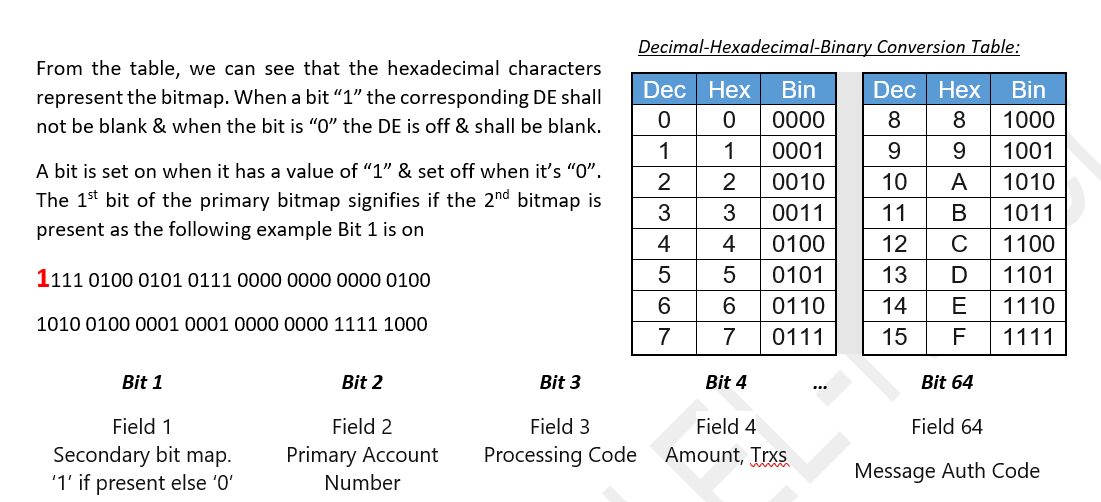
A bitmap is a string of binary (1s and 0s), acting like on/off switches. Each bit corresponds to a specific Data Element number.
- Bit set to 1 means the corresponding data element is included in the message.
- Bit set to 0 means it is not present.
Think of a bitmap like a paint-by-numbers canvas:
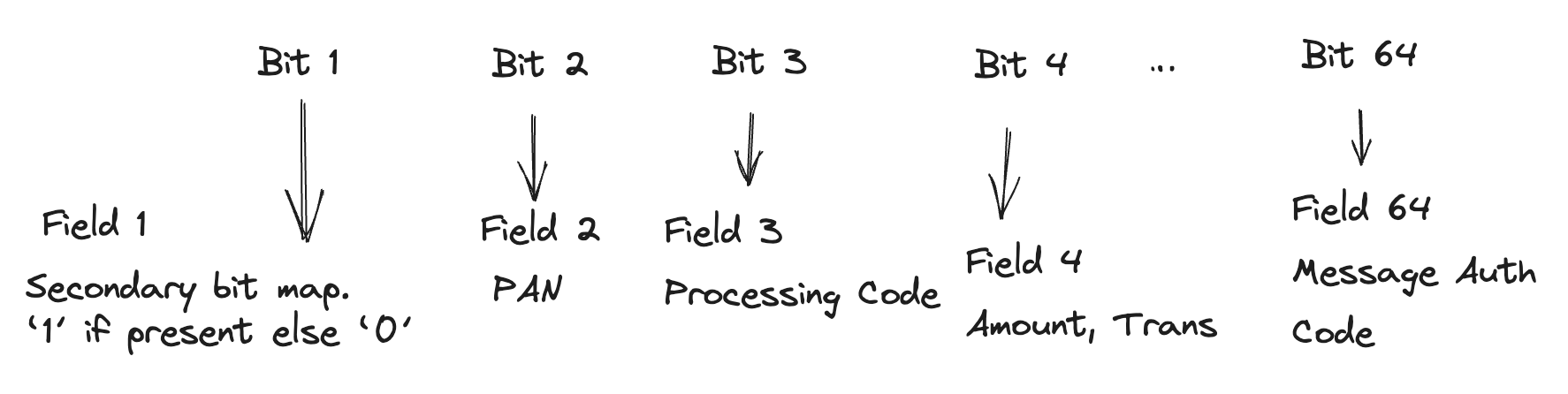
- If bit 1 is set, include Data Element 1
- If bit 2 is set, include Data Element 2
…and so on.
Bitmap Structure
- A bitmap contains 64 bits per block.
- A message must have at least 1 bitmap and can have up to 3 bitmaps (called primary, secondary, and tertiary).
- 1 bitmap = 64 bits
- 2 bitmaps = 128 bits
- 3 bitmaps = 192 bits
Single Bitmap Example
Hex bitmap: 4210001102C04804
Binary (64 bits):
0100|0010|0001|0000|0000|0000|0001|0001|
0000|0010|1100|0000|0100|1000|0000|0100- The first hex digit
4equals binary0100meaning bit 2 is set to 1, so Data Element 2 is present. - Bits for Data Element 7, 12, etc., are also present as indicated by the respective bits set to 1.
Secondary Bitmap Present
A bitmap with secondary bitmap presence starts with a hex digit like C which in binary is 1100.
- The first bit being 1 means the secondary bitmap (bits 65 to 128) is also present.
- For example, if bit 65 is set, Data Element 65 is present.
How to Read Bitmap
Always convert from Hexadecimal → Binary to clearly see which bits (data elements) are present.
Tertiary bitmaps exist but are rarely used.
Bitmap and Credit Card Messages
Each bitmap acts as a map to data elements within the message. This allows efficient construction by sending only necessary fields based on transaction type or stage, instead of sending all data fields.
Data Elements
Data elements are individual fields in a message:
- A Message = MTI + Bitmap + Data Elements
Examples:
- DE2 = Primary Account Number (PAN)
- DE3 = Processing Code
- DE4 = Transaction Amount
- DE7 = Transmission Date & Time
There can be up to 128 data elements when secondary bitmap is included.
Role of Data Elements
Data elements hold all the necessary transaction details: authorisation, amounts, reconciliation, etc. Their presence depends on the bitmap.
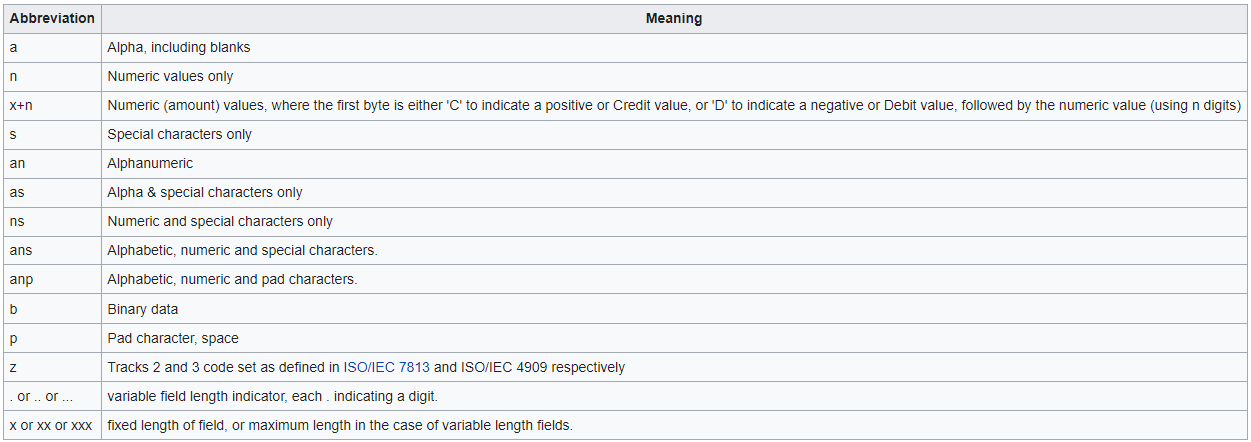
Handling Fixed and Variable Length Data Elements
Fixed Length Example
- DE3 (Processing Code) = fixed 6 digits
- DE4 (Transaction Amount) = fixed 12 digits
Example:
...| DE3 | DE4 |
...|000000|000000012345|
Means 6 digits for DE3, then 12 digits for DE4.
Variable Length Example (DE2 - PAN)
DE2 has variable length indicated by the first 2 digits specifying length.
Example:
164532012345678901000000000000012345
Split:
|16|4532012345678901|000000|000000012345|
|-- DE2 --| | DE3 | | DE4 |16indicates DE2 length is 16 digits:4532012345678901- DE3 is next 6 digits
000000 - DE4 is next 12 digits
000000012345
Summary
A message consists of three parts:
- MTI: Defines transaction category, message class, function, and origin (e.g., Authorisation, Reversal)
- Bitmap: Indicates which data elements are present
- Data Elements: Actual transaction data (PAN, amount, timestamp, etc.)
Messages use numerical data, not text, to efficiently communicate transaction details, telling the story behind every transaction — whether a barber experience gone wrong, or a birthday cake to your wife.
Resources: